StickyNotes
StickyNotes.exe
· 6.1 MB · Uploaded May 8, 2026 · 159 downloads
A simple little sticky notes utility. It allows pinning notes to be always on top and hiding from the taskbar. It keeps version history. Here is an AI generated description:
StickyNotes
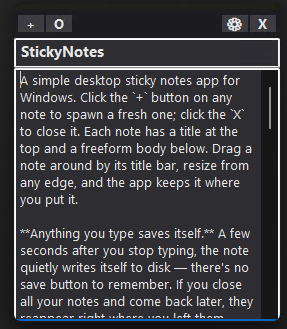
A simple desktop sticky notes app for Windows. Click the + button on any note to spawn a fresh one; click the X to close it. Each note has a title at the top and a freeform body below. Drag a note around by its title bar, resize from any edge, and the app keeps it where you put it.
Anything you type saves itself. A few seconds after you stop typing, the note quietly writes itself to disk — there's no save button to remember. If you close all your notes and come back later, they reappear right where you left them. Closing a blank note just makes it go away with no fuss.
A safety net for everything you write. Every save also keeps a copy of the previous version, so if you accidentally erase a paragraph you wanted to keep — or even clear an entire note and close it — you can get it back. Right-click any note's title bar and pick View history to browse old versions side-by-side with the current one. You can either bring an old version back into the current note (the current state automatically becomes a new history entry, so it's always reversible) or "promote" the old version into its own brand new note.
Make each note feel like yours. Click the gear icon to open settings: pick a background color from a palette of pastels, make the note translucent, pin it always on top, hide it from the taskbar, or switch to dark mode (it auto-picks dark or light based on your Windows theme). One handy option, "opaque with focus," lets a translucent note become fully solid while you're typing in it and fade back when you click away. New notes you create from another note inherit its look — so if you set up one yellow always-on-top note, the next one you spawn from it will match without any extra configuration.
Find any note again. The open dialog (the O button) shows a list of all your notes with a friendly date and a preview pane that displays the title, the body, and the note's own color. Tick "Show old versions" to also see every previous version of every note, including history from notes you've already deleted — nothing is lost without your explicit say-so. A delete button is there too, with a confirmation, so you can prune notes you no longer want.
It stays out of your way. A small icon lives in the system tray; left-click it for a new note, right-click for the Open and Quit menu. The whole app is one self-contained .exe with its own icon — drop it anywhere on your computer and run it.
StickyNotes.exe
6.1 MB (6,434,880 bytes)
May 8, 2026 (2026-05-08 13:01:10)
398fda3089eda7303c447ff24d7bc1c243127081f430dc75bfced083f3e2dfc4